# Frozen in time
Frozen in time, a joint Video and image retriever for end-end retrieval, based on the [original project](https://www.robots.ox.ac.uk/~vgg/research/frozen-in-time/), optimised for Graphcore's IPU.
A Joint Video and Image Encoder for End-to-End Retrieval
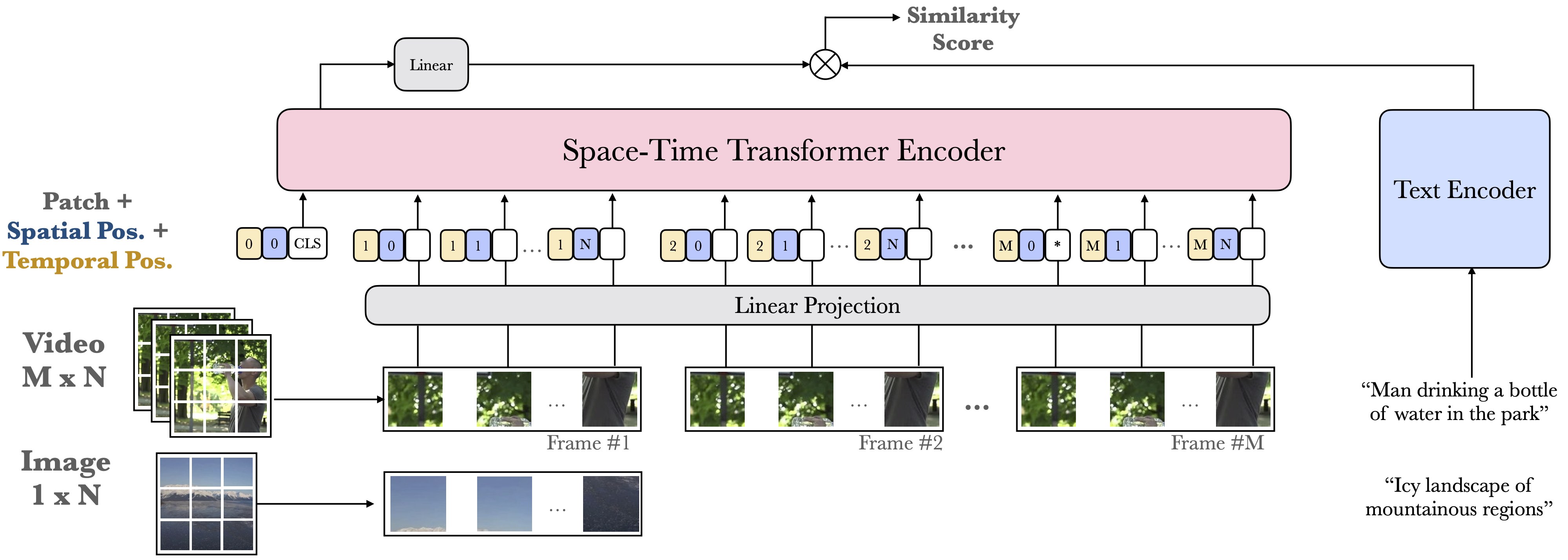
| Framework | Domain | Model | Datasets | Tasks | Training | Inference | Reference |
|-----------|--------|-------|----------|-------|----------|-----------|-----------|
| PyTorch | Vision | Frozen in time | | WebVid, MSR-VTT | ✅
Min. 8 IPUs (POD16) required |
❌ |[Frozen in Time: A Joint Video and Image Encoder for End-to-End Retrieval](https://arxiv.org/abs/2104.00650) |
WebVid data can be found [here](https://github.com/m-bain/webvid).
## Instructions summary
1. Install and enable the Poplar SDK (see Poplar SDK setup)
2. Install the system and Python requirements (see Environment setup)
3. Download the WebVid and MSR-VTT dataset (See Dataset setup)
## Poplar SDK setup
To check if your Poplar SDK has already been enabled, run:
```bash
echo $POPLAR_SDK_ENABLED
```
If no path is provided, then follow these steps:
1. Navigate to your Poplar SDK root directory
2. Enable the Poplar SDK with:
```bash
cd poplar---
. enable.sh
```
3. Additionally, enable PopART with:
```bash
cd popart---
. enable.sh
```
More detailed instructions on setting up your Poplar environment are available in the [Poplar quick start guide](https://docs.graphcore.ai/projects/poplar-quick-start).
## Environment setup
To prepare your environment, follow these steps:
1. Create and activate a Python3 virtual environment:
```bash
python3 -m venv
source /bin/activate
```
2. Navigate to the Poplar SDK root directory
3. Install the PopTorch (PyTorch) wheel:
```bash
cd
pip3 install poptorch...x86_64.whl
```
4. Navigate to this example's root directory
5. Install the apt requirements:
```bash
sudo apt install $(< required_apt_packages.txt)
```
5. Install the Python requirements:
```bash
pip3 install -r requirements.txt
```
More detailed instructions on setting up your PyTorch environment are available in the [PyTorch quick start guide](https://docs.graphcore.ai/projects/pytorch-quick-start).
## Dataset setup
### WebVid
As of 23 February 2024, these datasets are no longer available. The project [GitHub repository](https://github.com/m-bain/webvid) provides some guidance.
Download the videos:
```bash
python3 datasets/download.py --csv_path --part 0
python3 datasets/download.py --csv_path --part 0
```
Clean the videos:
```bash
mkdir data/WebVid/metadata
python3 datasets/clean_videos.py --csv_path --video_path data/WebVid/videos/ --clean_csv_path
python3 datasets/clean_videos.py --csv_path --video_path data/WebVid/videos/ --clean_csv_path
```
Disk space required:
```bash
```
### MSR-VTT
Download the dataset from the source
Disk space required:
```bash
```
## Running and benchmarking
To run a tested and optimised configuration and to reproduce the performance shown on our [performance results page](https://www.graphcore.ai/performance-results), use the `examples_utils` module (installed automatically as part of the environment setup) to run one or more benchmarks. The benchmarks are provided in the `benchmarks.yml` file in this example's root directory.
For example:
```bash
python3 -m examples_utils benchmark --spec
```
Or to run a specific benchmark in the `benchmarks.yml` file provided:
```bash
python3 -m examples_utils benchmark --spec --benchmark
```
For more information on using the examples-utils benchmarking module, please refer to [the README](https://github.com/graphcore/examples-utils/blob/master/examples_utils/benchmarks/README.md).
## License
This application is licensed under MIT license.
Please see the LICENSE file at the top-level of this repository.
The following files are created by Graphcore and are licensed under MIT License:
* README.md
* clean_videos.py
* modeling/model_patch.py
* test/*
The following files include code derived from the [Frozen-in-time repository](https://github.com/m-bain/frozen-in-time) which uses MIT license:
* arch.jpg
* run.py
* modeling/__init__.py
* modeling/loss.py
* modeling/metric.py
* modeling/model.py
* modeling/video_transformer.py
* modeling/trainer.py
* configs/*
* datasets/*
External packages:
- `torchvision` is licensed under BSD 3-Clause License
- `transformers` is licensed under Apache-2.0